
There are multiple reasons why you may need to cancel a Work Order. When this happens, Q-Shred makes the process simple.
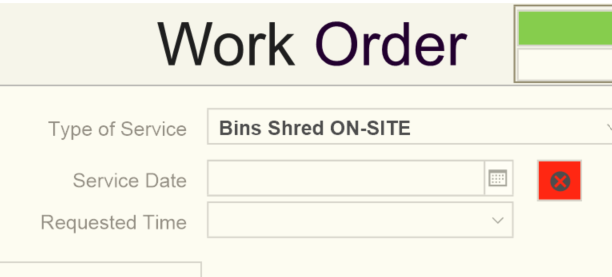
First, navigate to the Work Order in the usual fashion, and then locate the red “X” button located in the center column next to “Service Date”:
Clicking this button brings up the following window:
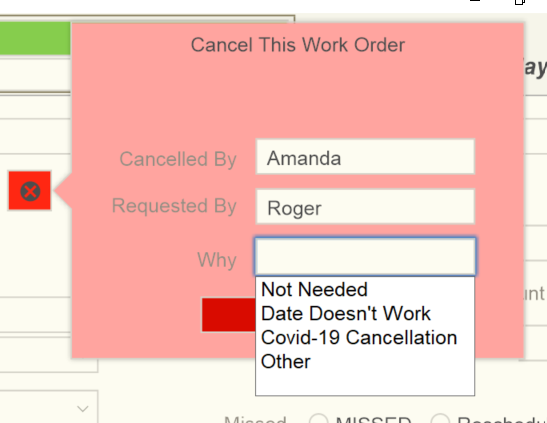
Clicking the field next to “Cancelled By” opens a drop-down menu with names of your office personnel, “Requested By” is a text entry field to allow you to record whomever contacted you to request the cancellation, and “Why” opens a drop-down with common reasons. Once these are entered, you click the red “CANCEL” box below the fields and the assignment is Cancelled.
This opens a pink box to the left clearly displaying the word “CANCELLED” on the Work Order:
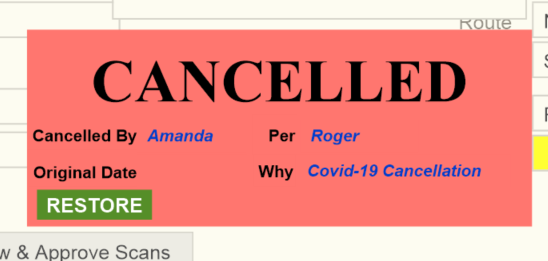
You will note the green “RESTORE” button. Should you need to un-cancel this Work Order, simply click the green button and the Work Order is live and workable again.